์ƒˆ๋กœ์šด ๊ธฐ๋Šฅ

์ตœ์‹  ๋ฆด๋ฆฌ์Šค, ๊ฐœ์„  ์‚ฌํ•ญ ๋ฐ ์ˆ˜์ • ์‚ฌํ•ญ์„ ํ™•์ธํ•˜์„ธ์š”.

@NotionHQ ํŒ”๋กœ์šฐํ•˜๊ธฐ

Control which AI models your agents can use

Control which AI models your agents can use

Whatโ€™s on your teamโ€™s model roster? Thatโ€™s up to you. With model controls, workspace owners can choose which AI models are available in Notion Agent and Custom Agents separately, and set a default model for Custom Agents. Keep costs predictable and support your compliance needs while your teams continue building. Available on Business and Enterprise plans.

Get started at Settings โ†’ Notion AI โ†’ General โ†’ Model controls.

์—์ด์ „ํŠธ์—๊ฒŒ ํŽธ์ง‘ ์ œ์•ˆ์„ ์š”์ฒญ

์ด์ œ ์—์ด์ „ํŠธ๊ฐ€ ๋ณ€๊ฒฝ ์‚ฌํ•ญ์„ ์ง์ ‘ ์ ์šฉํ•˜๋Š” ๋Œ€์‹  ํŽธ์ง‘ ์ œ์•ˆ์„ ํ•  ์ˆ˜ ์žˆ์Šต๋‹ˆ๋‹ค. ์—์ด์ „ํŠธ์—๊ฒŒ ํŽธ์ง‘ ์ œ์•ˆ์„ ์š”์ฒญํ•œ ๋‹ค์Œ, ์œ„์—์„œ ์•„๋ž˜๋กœ ์ด๋™ํ•˜๋ฉฐ ๊ฐ ํ•ญ๋ชฉ์„ ์Šน์ธํ•˜์„ธ์š”. ๋ฌธ๋ฒ• ๊ฒ€์‚ฌ์™€ ๊ฐ™์ด ํ–‰ ๋‹จ์œ„์˜ ๋ณ€๊ฒฝ์ด ํ•„์š”ํ•  ๋•Œ ์œ ์šฉํ•ฉ๋‹ˆ๋‹ค.

์šฐ์„  ์—์ด์ „ํŠธ์—๊ฒŒ โ€˜ํŽธ์ง‘ ์ œ์•ˆโ€™์„ ์š”์ฒญํ•ด ๋ณด์„ธ์š”.

Your Developer Portal, now in the sidebar

Manage your Workers, connections, and personal access tokens from the new Developer section of your Notion workspace. See an overview of deployed Workers and logs behind every run.

Developer sidebar section

Plus, the new developer bar makes it easy for anyone building with the API to find IDs for the page, database, block, workspace, or user. Copy any one of them, or the full API object, in one click.

Developer bar

Get started from Settings โ†’ Developer โ†’ Enable developer features. Go there now โ†’

Model selection, simplified

No more guessing which model to use.

The model picker now leads with a shortlist of models made for your hardest tasks, and every model has a scorecard to compare speed, intelligence, and cost. Pin your favorites for easy access and dial up the effort when you need a more thorough answer.

'๊ณต์œ ' ๋ฉ”๋‰ด์—์„œ ์ปค์Šคํ…€ ์—์ด์ „ํŠธ์™€ ๋งฅ๋ฝ ๊ณต์œ 

Share context with Custom Agents from the Share menu

์—์ด์ „ํŠธ๊ฐ€ ์œ ์šฉํ•˜๊ฒŒ ํ™œ์šฉํ•  ๋งŒํ•œ ๋ฌธ์„œ๋‚˜ ๋ฐ์ดํ„ฐ๋ฒ ์ด์Šค๊ฐ€ ์žˆ๋‚˜์š”? ์ด์ œ ๊ณต์œ  ๋ฉ”๋‰ด์—์„œ ์ง์ ‘ ๊ณต์œ ํ•ด ๋ณด์„ธ์š”. ๋” ์ด์ƒ ํด๋ฆญํ•ด์„œ ์—์ด์ „ํŠธ ์„ค์ •์œผ๋กœ ์ด๋™ํ•  ํ•„์š”๊ฐ€ ์—†์–ด์š”.

AI Meeting Notes can now trigger Custom Agents

Custom Agents can now run right after an AI Meeting Note is finished. No more need to manually update status trackers, post recaps to the project channel, or file tickets by hand.

Hereโ€™s a few of our favorite post-meeting workflows:

  • Update your project tracker with the latest status

  • Post a recap to Slack or email with decisions and next steps

  • Turn feedback into tickets for your engineering team

To get started, open your Custom Agentโ€™s settings, add the Meeting note summarized trigger, and choose which meetings kick it off. After your next call, your agent will get to work.

High contrast mode

Accessibility win! High contrast mode is a new display option that makes text, icons, and borders easier to read.

Try it by going to Settings > Preferences > Appearance. Available on desktop and web.

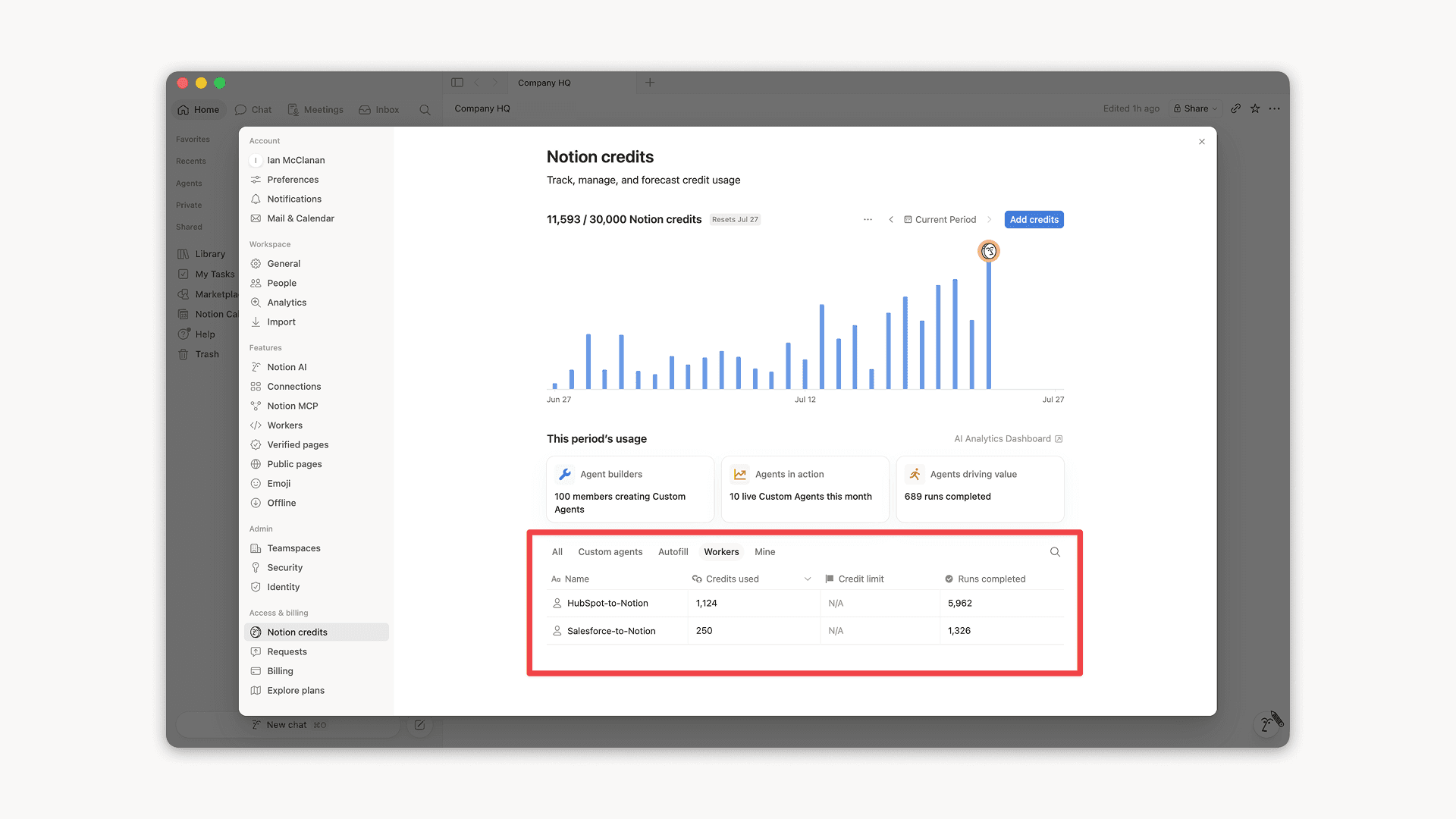
Workers, now in your Notion credits dashboard

Workers in the credits dashboard

Notion Workers run custom code on Notion's infrastructure to sync data, power tools for Custom Agents, and trigger webhook automations.

Now you can track your Workersโ€™ usage in the credits dashboard, alongside your other spend.

Workers are free to try during the beta on Business and Enterprise plans (including Business trials). Usage is now visible in the dashboard to help your team size credits before the beta ends.

Learn more about the Notion Workers beta and pricing in our Help Center โ†’

์ƒˆ๋กœ์šด ์—์ด์ „ํŠธ์šฉ ์บ˜๋ฆฐ๋” ๋„๊ตฌ

์ด์ œ ์—์ด์ „ํŠธ๊ฐ€ ์ผ์ •์„ ํ‘œ์‹œํ•˜๊ณ  ๊ด€๋ฆฌํ•  ์ˆ˜ ์žˆ๋Š” ์ƒˆ๋กœ์šด ์บ˜๋ฆฐ๋” ๋„๊ตฌ๋ฅผ ์‚ฌ์šฉํ•  ์ˆ˜ ์žˆ๊ฒŒ ๋˜์—ˆ์Šต๋‹ˆ๋‹ค. ํšŒ์˜ ์ฐธ๊ฐ€, ์ดˆ๋Œ€์žฅ ์ „์†ก, ๋ชจ๋‘์—๊ฒŒ ์ ํ•ฉํ•œ ์‹œ๊ฐ„ ํ™•์ธ ๋“ฑ ๋‹ค์–‘ํ•œ ์ž‘์—…์„ ์ฑ„ํŒ…์—์„œ ๊ฐ„ํŽธํ•˜๊ฒŒ ์ˆ˜ํ–‰ํ•˜์„ธ์š”.

์—์ด์ „ํŠธ์—๊ฒŒ ๋‹ค์Œ๊ณผ ๊ฐ™์ด ์งˆ๋ฌธ ๋˜๋Š” ์š”์ฒญํ•ด ๋ณด์„ธ์š”.

  • '์˜ค๋Š˜ ๋‚˜๋Š” ์–ด๋–ค ์ผ์ •์„ ์ˆ˜ํ–‰ํ•ด์•ผ ํ•˜๋‚˜์š”?'

  • '๊น€์˜ˆ์ง€ ๋‹˜๊ณผ์˜ ํšŒ์˜๋ฅผ ์˜คํ›„ 1์‹œ๋กœ ์˜ฎ๊ฒจ ์ฃผ์„ธ์š”.'

  • '๋‚ด์ผ ์˜คํ›„ 2์‹œ~5์‹œ ์‚ฌ์ด์— ๋Œ€ํ•ด ์ผ์ • ์žก๊ธฐ ๋งํฌ๋ฅผ ์ƒ์„ฑํ•ด์ฃผ์„ธ์š”.'

์—์ด์ „ํŠธ์—๊ฒŒ '์บ˜๋ฆฐ๋”๋ฅผ ์—ฐ๊ฒฐ'ํ•ด ๋‹ฌ๋ผ๊ณ  ์š”์ฒญํ•˜๊ฑฐ๋‚˜ ์„ค์ • โ†’ ์—ฐ๊ฒฐ๋กœ ์ด๋™ํ•˜์—ฌ ์‹œ์ž‘ํ•˜์„ธ์š”. ๋ฐ์Šคํฌํ†ฑ์—์„œ ์‚ฌ์šฉ ๊ฐ€๋Šฅํ•ฉ๋‹ˆ๋‹ค. ๋ชจ๋ฐ”์ผ ๋ฒ„์ „๋„ ๊ณง ์ถœ์‹œ ์˜ˆ์ •์ž…๋‹ˆ๋‹ค!

ํŒ€์› ๋ชจ๋‘์™€ Notion Workers ๊ณต์œ ํ•˜๊ธฐ

์ด์ œ Notion Workers์™€ ๊ณต์œ ํ•  ์ˆ˜ ์žˆ์Šต๋‹ˆ๋‹ค.

ํŒ€์›๊ณผ ํ•จ๊ป˜ Workers๋ฅผ ๊ตฌ์ถ•ํ•˜๊ณ  ์ง€์†์ ์œผ๋กœ ๊ฐœ์„ ํ•˜์„ธ์š”. ๋˜๋Š” ํŒ€์›์ด ์ž์‹ ์˜ ์ปค์Šคํ…€ ์—์ด์ „ํŠธ์— ์—ฐ๊ฒฐํ•  ์ˆ˜ ์žˆ๋„๋ก ๊ณต์œ ํ•˜์„ธ์š”. ํ•œ ๋ช…์˜ ํŒ€์›์ด ๊ตฌ์ถ•ํ•œ Salesforce Worker๊ฐ€ ์ด์ œ ์˜์—…ํŒ€๊ณผ ๋งˆ์ผ€ํŒ…ํŒ€ ์ „์ฒด์˜ ์—์ด์ „ํŠธ๋ฅผ ์ง€์›ํ•œ๋‹ค๊ณ  ์ƒ์ƒํ•ด ๋ณด์„ธ์š”.

์—ฐ๊ฒฐ ๊ฐ€๋Šฅ์„ ํ†ตํ•ด ํŒ€์›์ด ํšŒ์›๋‹˜์˜ Worker๋ฅผ ์‚ฌ์šฉํ•  ์ˆ˜ ์žˆ์œผ๋ฉฐ, ๋ชจ๋‘ ํ—ˆ์šฉ์„ ํ†ตํ•ด ํŒ€์›์€ Worker๋ฅผ ๊ฐœ์„ ํ•˜๊ฑฐ๋‚˜ ์ƒˆ๋กœ์šด ๋ฌธ์ œ์— ์ ์šฉํ•  ์ˆ˜ ์žˆ์Šต๋‹ˆ๋‹ค.

๊ฐœ๋ฐœ์ž ํฌํ„ธ์—์„œ ์„ค์ • โ†’ ์—ฐ๊ฒฐ โ†’ ๊ฐœ๋ฐœ์ž ํฌํ„ธ๋กœ ์ด๋™์„ ํ†ตํ•ด ์‹œ์ž‘ํ•˜๊ฑฐ๋‚˜ app.notion.com/developers๋ฅผ ๋ฐฉ๋ฌธํ•˜์„ธ์š”.

Powered by Fruition