





كيف يمكنني نقل كل محتوى Notion الخاص بي إلى مساحة عمل مختلفة؟
كيف يمكنني نقل كل محتوى Notion الخاص بي إلى مساحة عمل مختلفة؟
ملاحظة: سيتم تكرار أي محتوى يتم نقله إلى مساحة العمل الجديدة، وأحياناً تواجه هذه الصفحات مشكلات. لمزيد من المعلومات، انقر هنا.
لنقل المحتوى الخاص بك من مساحة عمل إلى أخرى مرتبطة بنفس الحساب، انقر على ••• بجوار كل صفحة من الصفحات ذات المستوى الأعلى في الشريط الجانبي (أو انقر بزر الماوس الأيمن) واختر نقل إلى. في أسفل قائمة النقل، سترى قائمة منسدلة لاختيار مساحة عمل مختلفة.
عند نقل الصفحات ذات المستوى الأعلى، تنتقل معها جميع صفحاتها الفرعية. ستظهر في قسم Private ولكن يمكن نقلها إلى أي مكان ترغب في وضعها فيه.
لقد نقرت على زر الانضمام إلى مساحة عمل أو إنشائها، لكنه يسمح لي فقط بإنشاء مساحة عمل. كيف يمكنني الانضمام إلى مساحة عمل؟
لقد نقرت على زر الانضمام إلى مساحة عمل أو إنشائها، لكنه يسمح لي فقط بإنشاء مساحة عمل. كيف يمكنني الانضمام إلى مساحة عمل؟
يمكنك فقط الانضمام إلى مساحة عمل عبر زر الانضمام إلى مساحة عمل موجودة أو إنشاء واحدة جديدة إذا كانت مساحة العمل هذه قد فعّلت إعداد نطاقات البريد الإلكتروني المسموح بها لتمكين المستخدمين الذين لديهم نطاق بريدك الإلكتروني من الانضمام إلى مساحة العمل تلقائياً.
وإلا، سيتعيّن عليك أن تطلب من مسؤول في مساحة العمل إرسال دعوة إليك.
عندما أشترك في خطة مدفوعة، هل تغطي جميع مساحات عمل الخاصة بي؟
عندما أشترك في خطة مدفوعة، هل تغطي جميع مساحات عمل الخاصة بي؟
تنطبق الخطط المدفوعة على مساحة عمل واحدة فقط ولا تغطي الحساب بالكامل. مساحات عمل عبارة عن صوامع منفصلة تماماً، لذا لن تتمكن من ربط أي محتوى بينها.
نوصي باستخدام أقل عدد ممكن من مساحات العمل، والاستفادة من الصفحات ذات المستوى الأعلى في الشريط الجانبي للحفاظ على التنظيم.
كيف يمكنني التبديل بين مساحات عمل المرتبطة بعناوين بريد إلكتروني مختلفة؟
كيف يمكنني التبديل بين مساحات عمل المرتبطة بعناوين بريد إلكتروني مختلفة؟
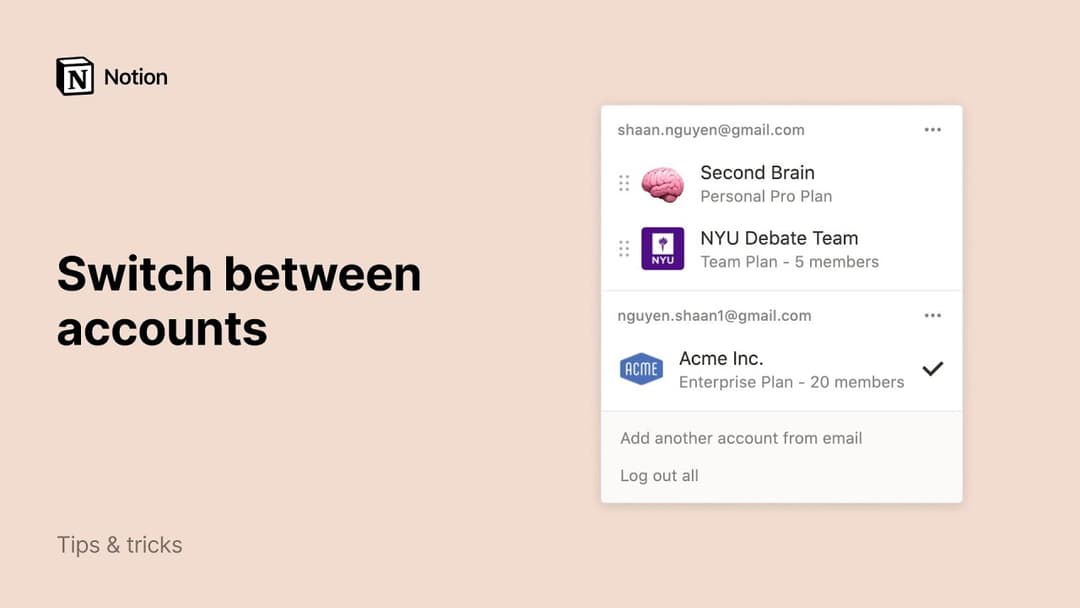
لإضافة مساحات عمل الخاصة بك من حساب بريد إلكتروني آخر، استخدم زر إضافة حساب آخر في مبدل مساحة عمل في أعلى يسار نافذة Notion، واتبع الخطوات لتسجيل الدخول إلى حسابك الآخر.
هل هناك حد لعدد الحسابات التي يمكنني تسجيل الدخول إليها؟
هل هناك حد لعدد الحسابات التي يمكنني تسجيل الدخول إليها؟
لا يوجد حد حالياً، على الرغم من أنك قد تواجه أداءً أبطأ إذا كنت مسجلاً الدخول إلى أكثر من 10 حسابات في وقت واحد.
لقد نسيت تسجيل الخروج من حسابي على جهاز كمبيوتر عام، أو تمت سرقة جهازي.
لقد نسيت تسجيل الخروج من حسابي على جهاز كمبيوتر عام، أو تمت سرقة جهازي.
إذا كنت لا تزال مسجلاً الدخول على جهاز يمكنك الوصول إليه، فانتقل إلى الإعدادات ← {اسمك} ← سجِل الخروج من جميع الأجهزة.
إذا لم يعد بإمكانك الوصول إلى حسابك، فيرجى إرسال رسالة سريعة إلينا على [email protected]، أو استخدام وجه Notion AI في أسفل يمين التطبيق. يمكننا تسجيل خروجك عن بُعد!